SOC Investigation 01: Impossible Travel
Impossible travel sounds like one of those alerts that explains itself. Two countries, one account, not enough time in between. Case closed, right?
Not quite. The pattern in the logs was only the symptom. The real story was underneath it: why did the tenant let this happen at all? That’s the question this investigation actually answers, and the answer turned out to be more interesting than “someone forgot to turn MFA on.”
Here’s how it unfolded, using the same Alert → Validation → Scope → Investigation → Containment → Recovery → Conclusion structure I’m using across this whole SOC portfolio.
🚨 Alert
Sign in activity for a single tenant account ([account]@securityinspired0.onmicrosoft.com) was reviewed in Microsoft Sentinel against the SigninLogs table. The activity showed successful authentications from two geographically distant locations within a time window too short for legitimate travel: a sign in from Great Britain followed by a sign in from the Netherlands 5 minutes and 20 seconds later, and on a separate occasion, a sign in from Great Britain followed by one from Canada within under 3 minutes. Both locations reverted back to Great Britain shortly after, producing the same impossible gap in reverse.
No commercial flight does that. This pattern was surfaced by querying successful sign ins over a rolling window and reviewing timestamp, location, and IP address for the account, rather than through a pre built Sentinel analytics rule.
SigninLogs
| where TimeGenerated > ago(7d)
| where ResultType == 0
| project TimeGenerated, UserPrincipalName, AppDisplayName, IPAddress, Location, DeviceDetail
| order by TimeGenerated desc
| take 50
 Raw
Raw SigninLogs output showing the account alternating between Great Britain and Netherlands IP addresses within minutes.
🔍 Validation
Before treating this as real, I needed to rule out the boring explanation: a logging glitch, a VPN artefact, a shared account, something dull. So I reordered the sign ins chronologically and calculated the actual time delta between every location change.
SigninLogs
| where TimeGenerated > ago(7d)
| where UserPrincipalName == "[account]@securityinspired0.onmicrosoft.com"
| where ResultType == 0
| project TimeGenerated, Location, IPAddress, AppDisplayName, AuthenticationRequirement, ConditionalAccessStatus
| order by TimeGenerated asc
| serialize
| extend PrevLocation = prev(Location), PrevTime = prev(TimeGenerated)
| extend MinutesSinceLastSignin = datetime_diff('minute', TimeGenerated, PrevTime)
| where Location != PrevLocation
| project TimeGenerated, PrevLocation, Location, MinutesSinceLastSignin, IPAddress, AuthenticationRequirement, ConditionalAccessStatus
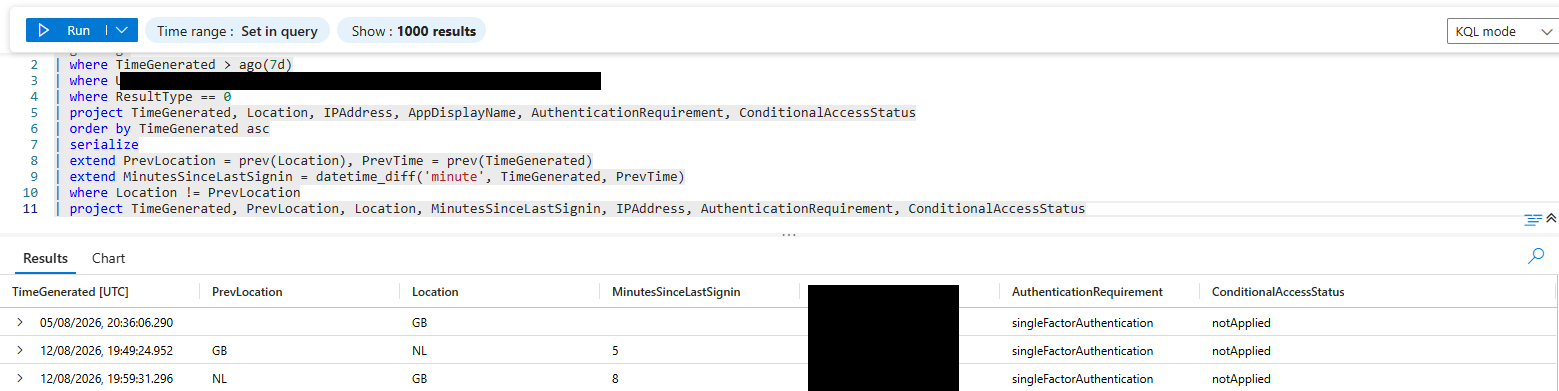 Time delta calculation confirming the location change occurred within 5 and 8 minutes, with
 ConditionalAccessStatus showing notApplied on every row.
Two location changes, 5 minutes and 8 minutes respectively. Both well below any realistic travel time between the countries involved. So the pattern was real. But the column that actually mattered here wasn’t the timing, it was ConditionalAccessStatus, and it read notApplied on every single row. Nothing was watching this. That detail is what turned this from “interesting log entry” into “actual investigation.”
🌍 Scope
Before going deeper into this one account, I needed to know: is this isolated, or is the whole tenant compromised?
SigninLogs
| where TimeGenerated > ago(7d)
| where ResultType == 0
| project TimeGenerated, UserPrincipalName, Location, IPAddress
| order by UserPrincipalName, TimeGenerated asc
| serialize
| extend PrevLocation = prev(Location), PrevUser = prev(UserPrincipalName), PrevTime = prev(TimeGenerated)
| where UserPrincipalName == PrevUser
| extend MinutesSinceLastSignin = datetime_diff('minute', TimeGenerated, PrevTime)
| where Location != PrevLocation and MinutesSinceLastSignin < 60
| project UserPrincipalName, TimeGenerated, PrevLocation, Location, MinutesSinceLastSignin, IPAddress
A supporting query confirmed only one account had any authentication activity in the tenant during the review window:
SigninLogs
| where TimeGenerated > ago(7d)
| distinct UserPrincipalName
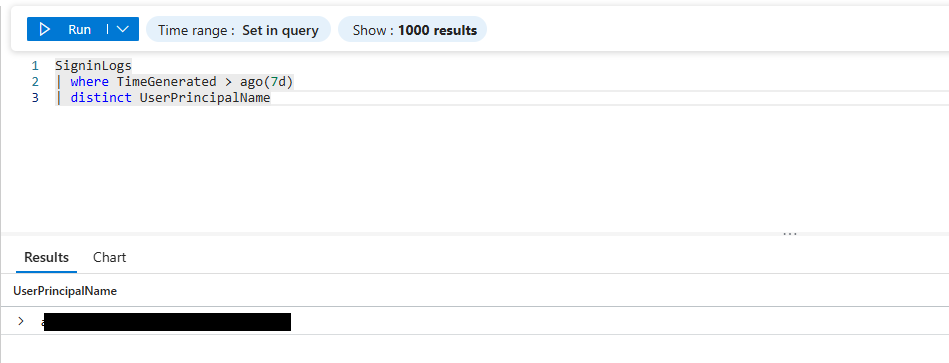 Only one account shows any authentication activity in the tenant during the review window.
One account, no lateral spread. Scope confirmed and contained. Good news for this investigation, but it also meant there was nowhere to hide from the next question: why did this account get through at all?
🕵️ Investigation
This is where it stopped being a “logging curiosity” and became a genuine finding. A follow up query pulled AuthenticationRequirement and AuthenticationDetails alongside ConditionalAccessStatus to see the full picture.
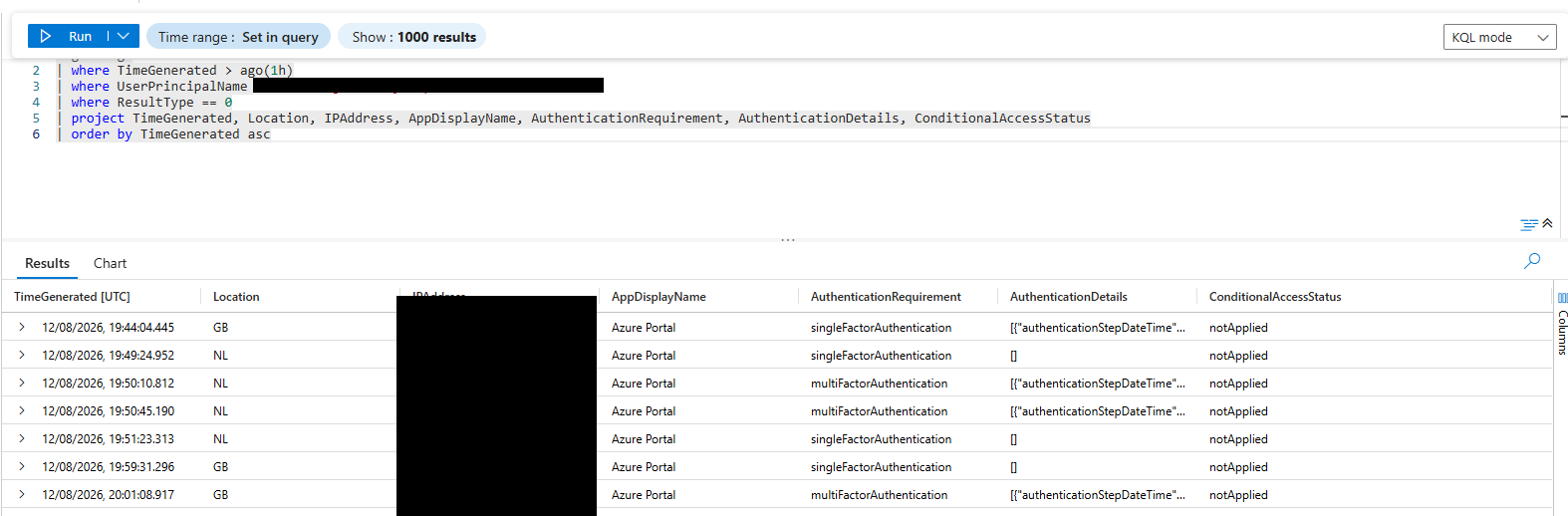
AuthenticationRequirement alternates between single and multi factor across the same session, while ConditionalAccessStatus remains notApplied throughout.
Expanding the AuthenticationDetails field on the affected sign ins (via the sign in log’s Authentication Details tab in the Entra portal) showed the following for every sign in in the impossible travel window, including the ones from foreign locations:
"authenticationMethod": "Previously satisfied"
"authenticationStepResultDetail": "MFA requirement satisfied by claim in the token"
 Expanded
 AuthenticationDetails JSON confirming MFA was satisfied once and then reused as a token claim across both the GB and NL sign ins.
Here’s the part that actually matters: MFA had been satisfied once, early in the session, and that satisfaction got baked into the token as a claim. Every sign in after that, from any location, just inherited the claim instead of proving anything fresh. Think of it like a wristband at a festival. Security checks you once at the gate, and after that the wristband does all the talking, nobody looks at your face again. A stolen or replayed token gets to wear that same wristband, no matter where it’s actually being worn from.
So this wasn’t really “MFA got bypassed.” It was “MFA satisfaction became portable and stopped caring where it was used.” That’s a meaningfully different, more accurate finding, and it’s exactly the kind of thing token theft and adversary in the middle phishing kits rely on.
Cross referencing this against the tenant’s Conditional Access configuration explained why nothing stepped in:
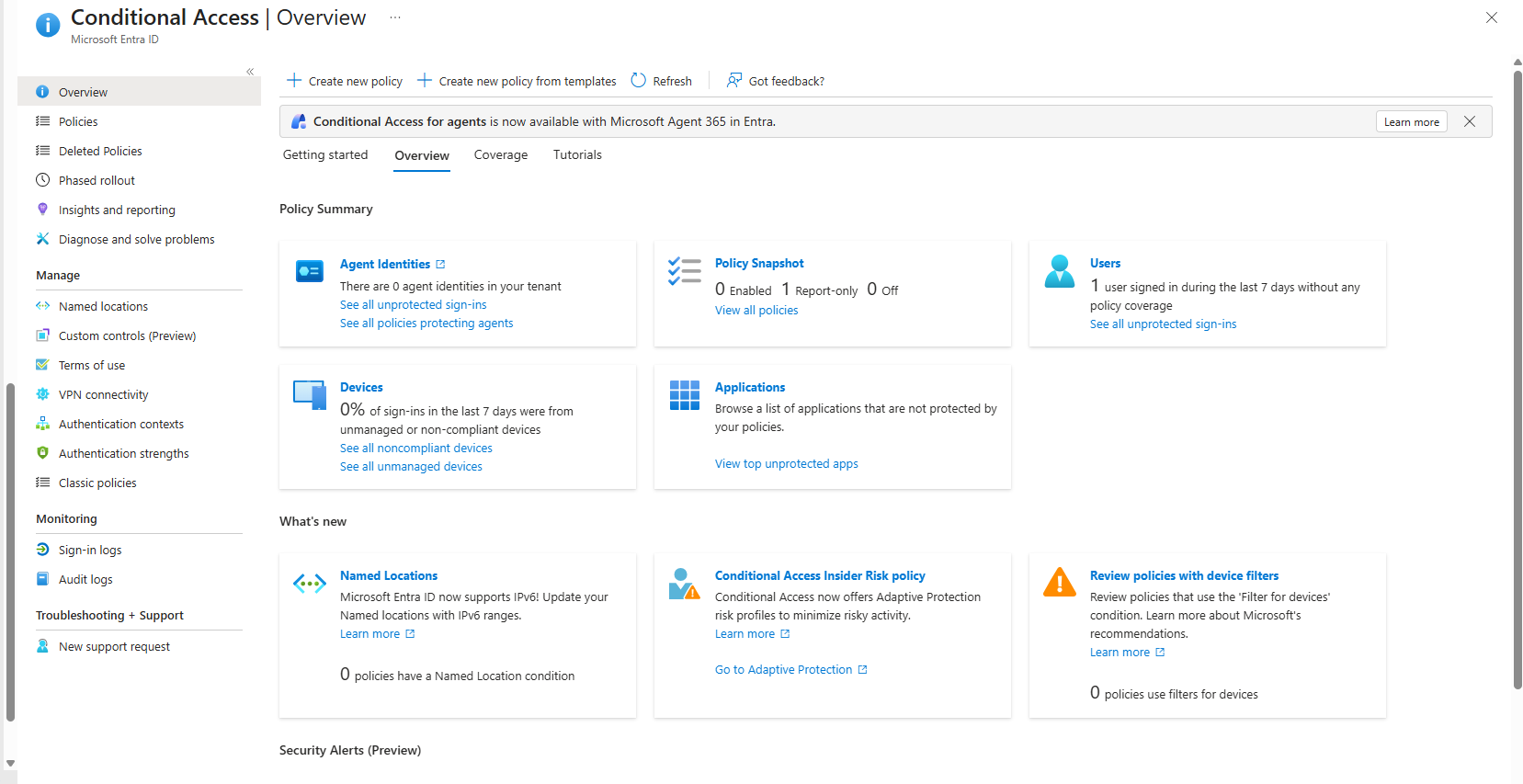 Conditional Access overview at the time of the incident: 0 enabled policies, 1 in Report only, 0 policies with a Named Location condition.
Zero enforced policies. One policy sitting in Report only, logging but never blocking. Zero policies that even had a Named Location condition to catch a scenario like this one. There was, quite literally, nothing in this tenant capable of noticing “this session just teleported.”
🛑 Containment
Whatever else got fixed, the first move was killing the session that was actively carrying the reused claim. That meant revoking active sessions and refresh tokens for the account via the Entra admin center (Users → the account → Revoke sessions).
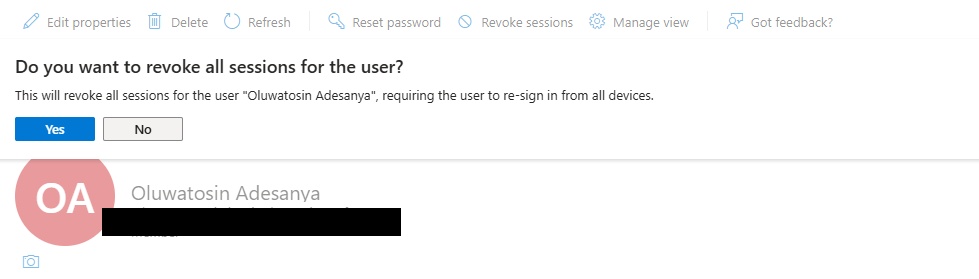 Revoking all active sessions for the account via the Entra admin center.
Confirmed via the native Entra ID audit log:
Activity: Update StsRefreshTokenValidFrom
Status: Success
Target: [account]
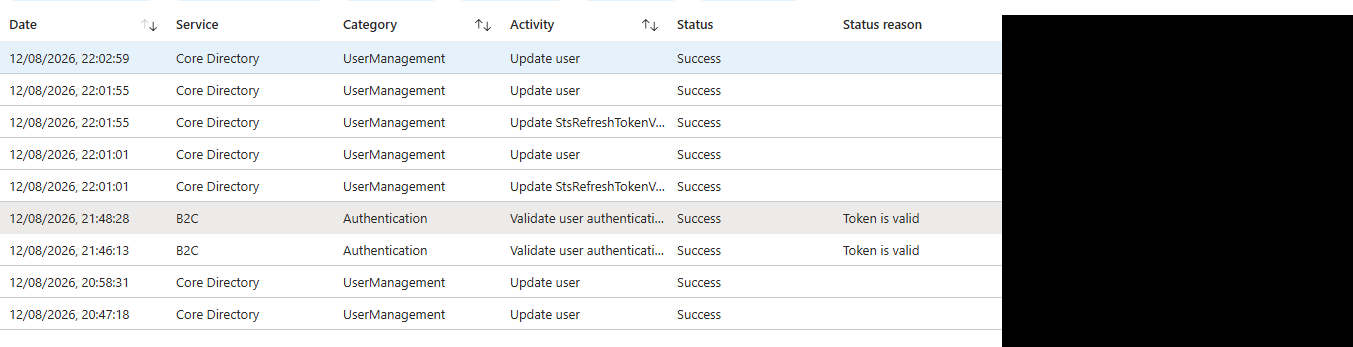 Native Entra ID audit log confirming the
 Update StsRefreshTokenValidFrom operation succeeded.
That operation resets the refresh token validity timestamp for the account. Any token issued before that moment, including the one carrying the reused MFA claim, is now dead on arrival. The account has to prove itself all over again.
🛠️ Recovery
Containment stops the bleeding. Recovery is what stops it from happening again. I designed and deployed a new Conditional Access policy, CA01-ImpossibleTravel-SessionControls-Response, built specifically around what the investigation found:
- Users: targeted account
- Cloud apps: all resources
- Locations: Include – Any location; Exclude – a Named Location representing the account’s trusted IP
- Grant control: Require multifactor authentication
- Session controls: Sign in frequency (forces periodic re authentication rather than indefinite token reuse), persistent browser session set to never persistent
Deployed in Report only first, because you don’t get to find out a policy locks people out by enforcing it blind.
And here’s the part I almost didn’t write up, because it’s a little embarrassing, except it’s actually the most useful part of the whole investigation: the policy didn’t work on the first try.
Sign ins from both the trusted GB location and a foreign test location came back Network: Not matched. Meaning the policy wasn’t evaluating anything, regardless of where the sign in came from.
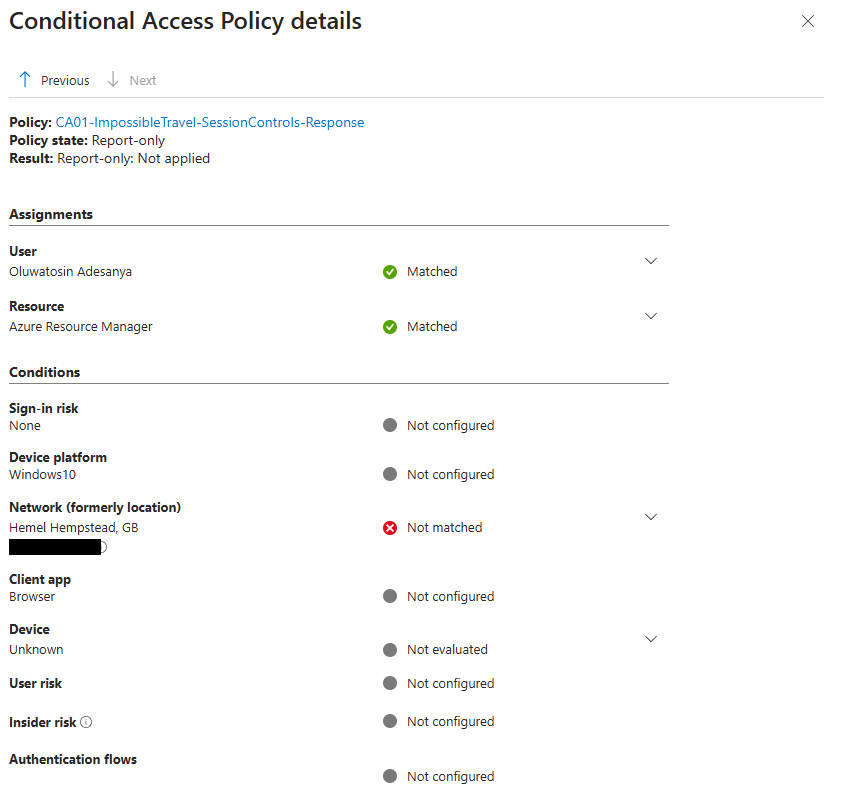 Even a sign in from the account’s own trusted GB location returned
 Network: Not matched, the first sign that the location condition was broken.
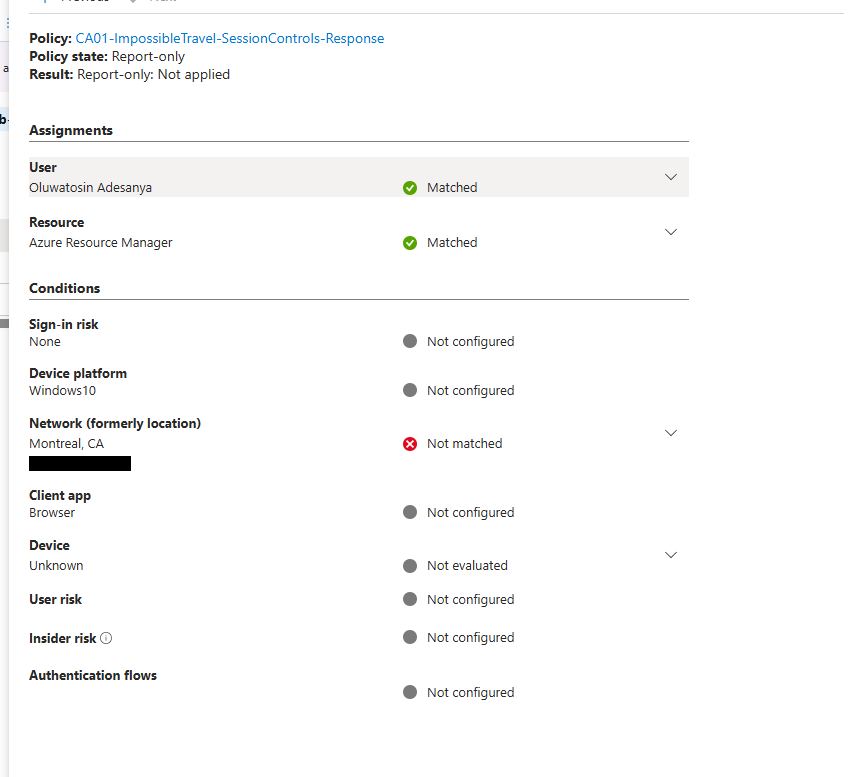 A foreign test sign in from Canada also returned
 Not matched, confirming the policy wasn’t evaluating location at all, regardless of origin.
Two bugs, stacked on top of each other. First, the Named Location meant to represent “trusted GB” had never actually been flagged as trusted in Entra:
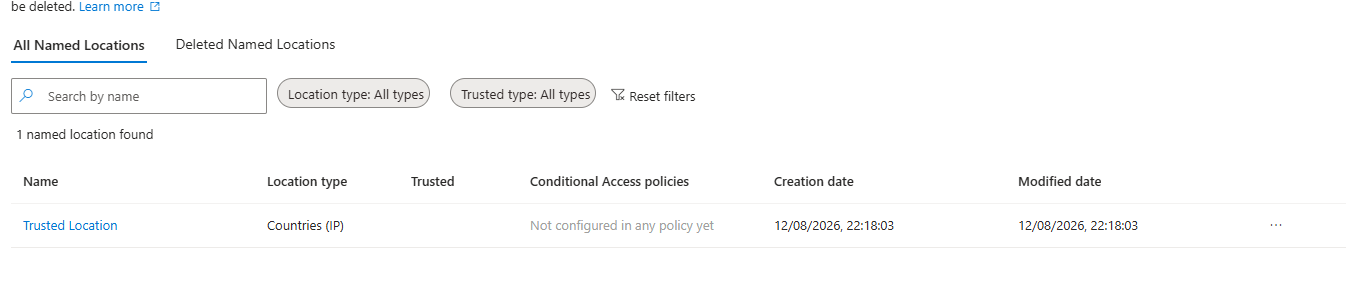 The Named Location’s
 Trusted column is blank, and it shows as “Not configured in any policy yet.”
Second, and this is the one that actually inverted the whole point of the policy: the location condition had Include set to “All trusted locations” instead of “Any location.” Which means the policy would only ever look at sign ins that were already coming from somewhere trusted. Exactly backwards from what an impossible travel control needs to do.
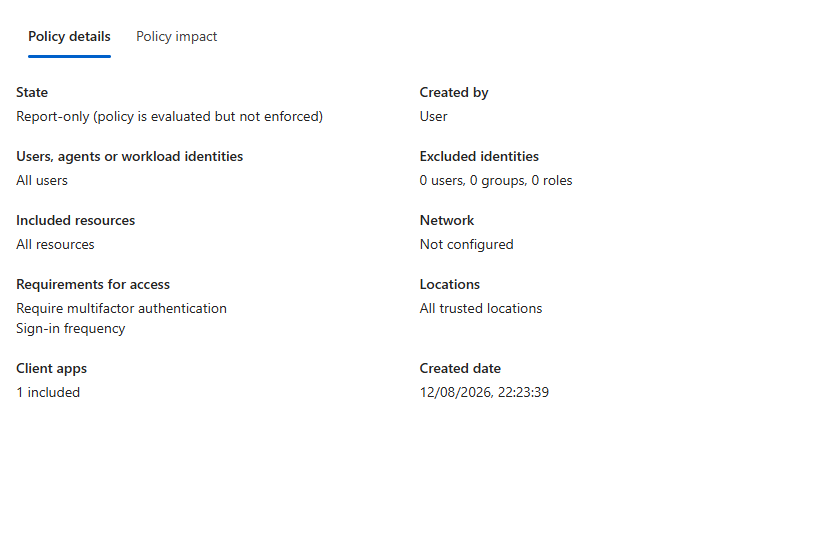 Policy summary confirming the Include condition was set to “All trusted locations” instead of “Any location,” inverting the intended logic.
Fixed both. Marked the Named Location as trusted, then flipped the policy to Include: Any location, Exclude: the trusted Named Location.
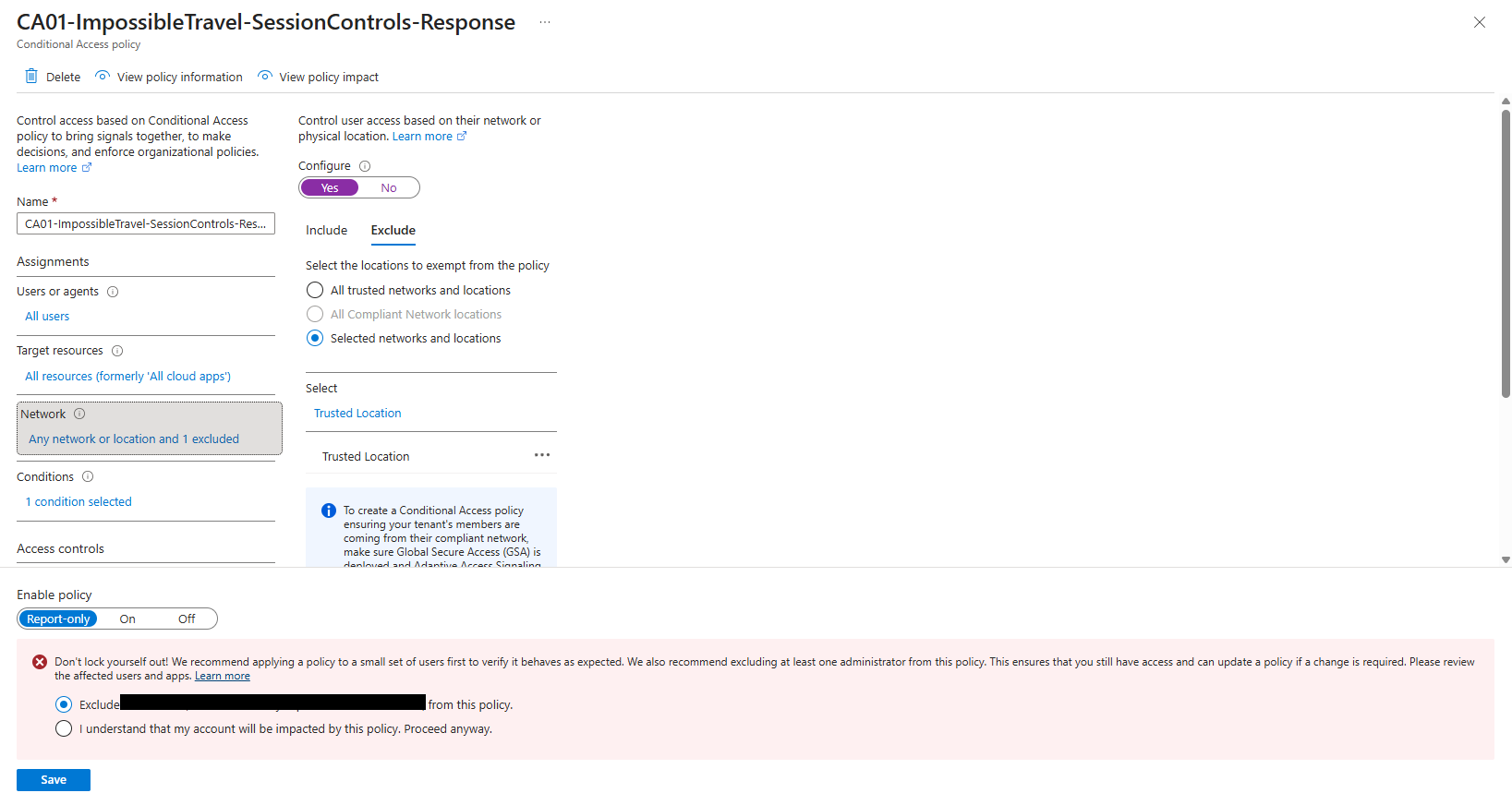 Corrected configuration: Include set to any location, with the trusted Named Location excluded.
Re tested with a fresh foreign sign in. The policy went from “Not applied” to actually evaluating:
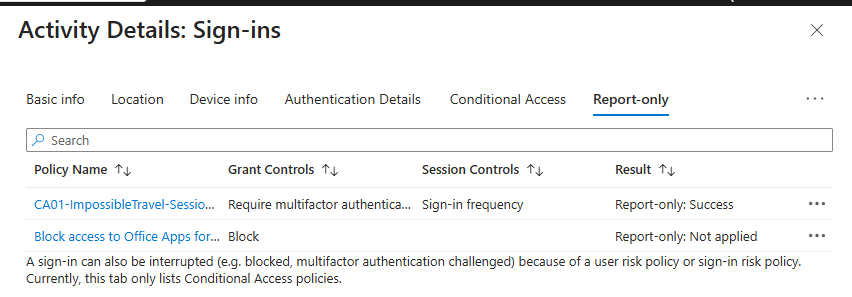 The policy now evaluates the sign in rather than skipping it entirely, returning
 Report only: Success.
Then a final validation sign in from the Netherlands, and this time everything lined up:
- Network: Matched
- Grant Controls: Satisfied
- Session Controls: Enforced
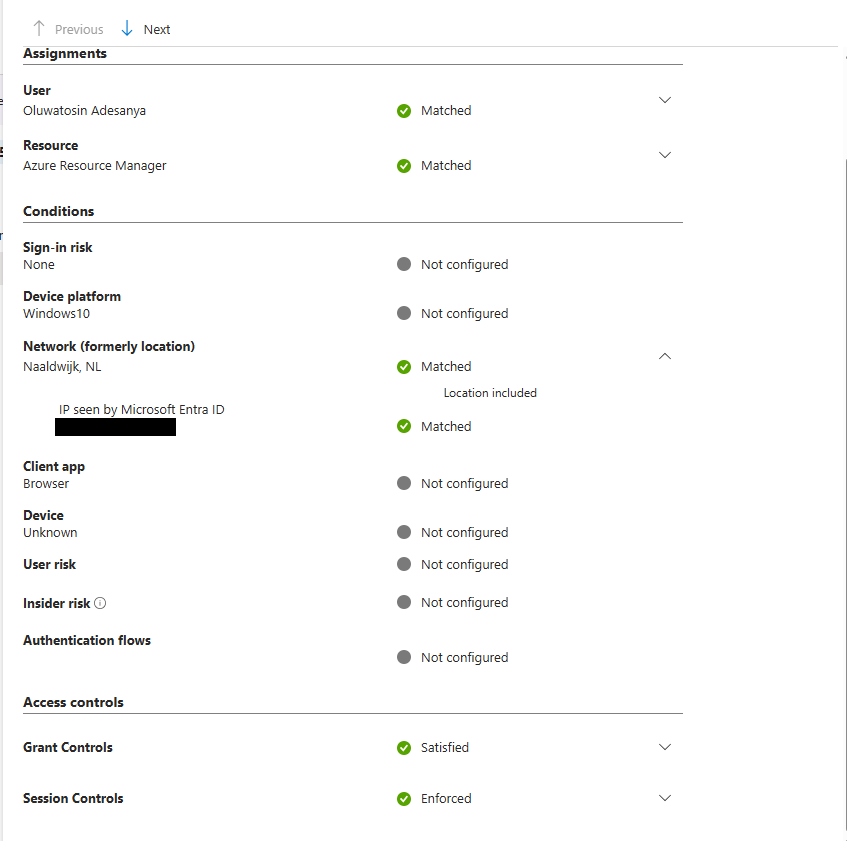 Final validation: the corrected policy correctly matches the foreign sign in and would enforce both grant and session controls if switched to On.
With that confirmed, I switched the policy from Report only to On.
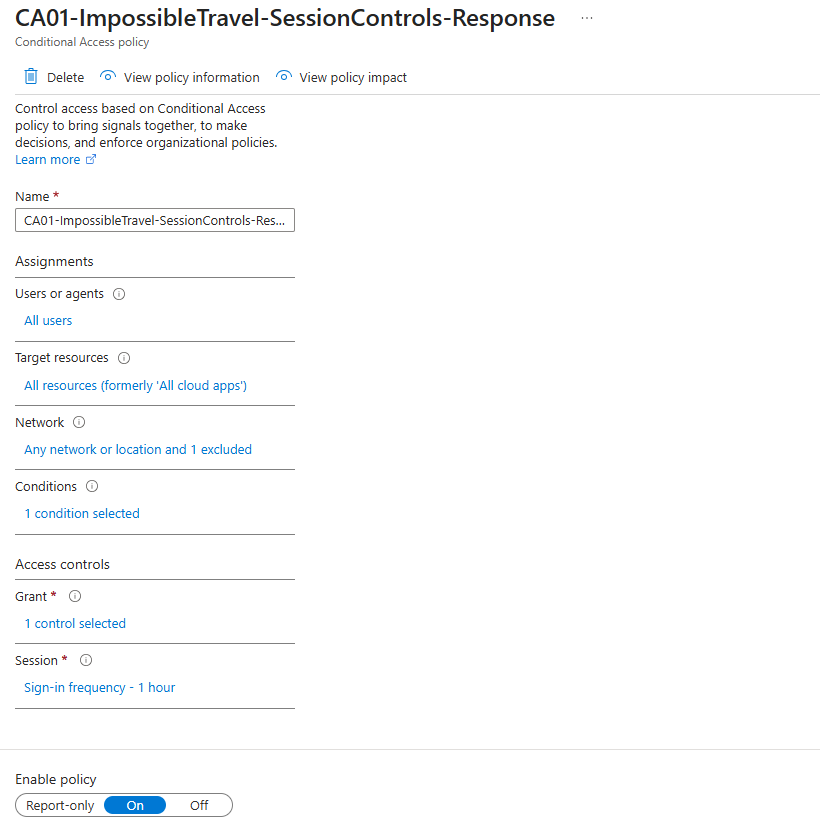 The policy’s Enable setting switched from Report only to On.
The audit log backed up the exact moment of that change, right down to the field that flipped:
Old Value: "state":"enabledForReportingButNotEnforced"
New Value: "state":"enabled"
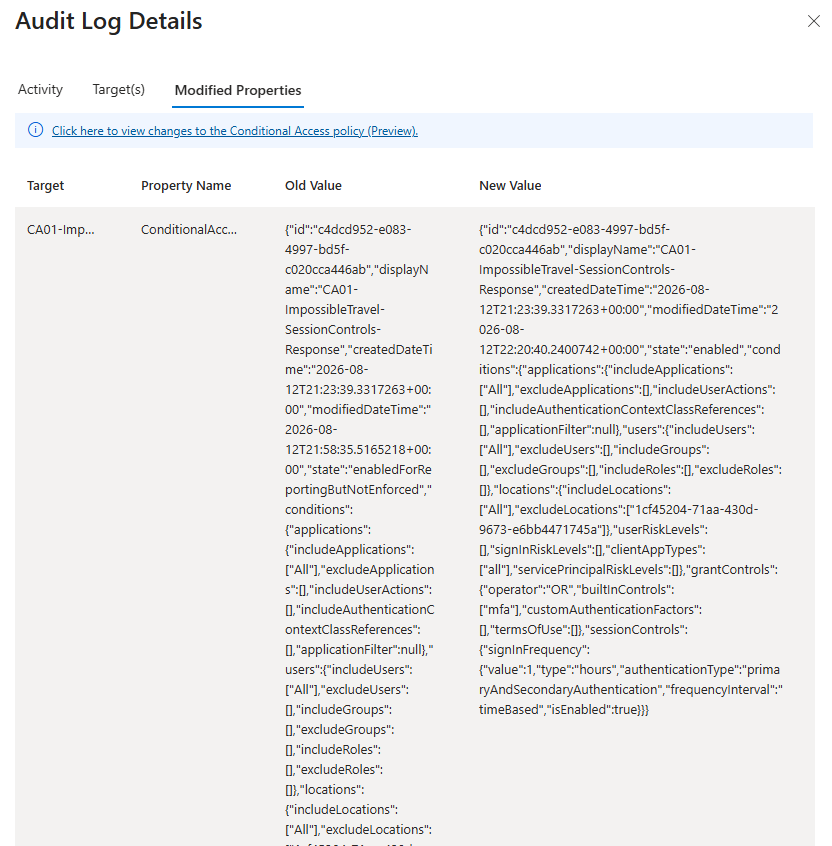 Audit log evidence of the exact state transition, from Report only to enforced, along with the full corrected policy configuration.
And then, because “it’s working” isn’t evidence, a follow up sign in from the trusted GB location after enforcement confirmed I hadn’t locked myself out:
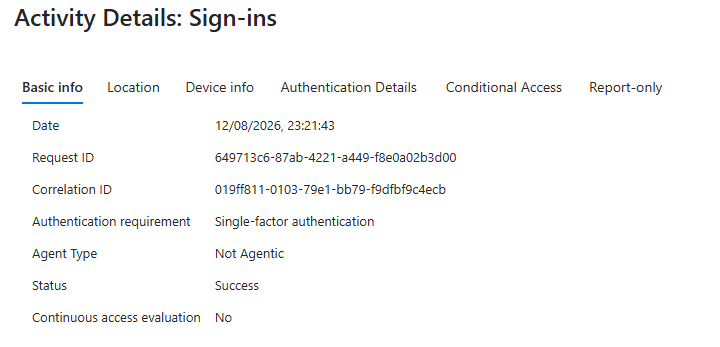 A successful sign in from the trusted location, timestamped after enforcement, confirming no lockout occurred.
🧾 Conclusion
What started as a straightforward impossible travel pattern turned out to be a token based MFA bypass. MFA satisfaction was being carried as a portable claim inside the session token instead of being re checked against context, so the control never actually stopped a token from being used across locations that were physically impossible to reach from each other in the time given. This is the exact mechanism behind real world token theft and adversary in the middle phishing, where the attacker never needs to solve MFA themselves, they just inherit a token that already has.
The tenant had zero enforced Conditional Access policies at the time, and the one policy that did exist was sitting in Report only, watching but never acting. Fixing that meant more than just switching a toggle. It meant designing a policy with the right session controls to force re validation on a schedule, then catching and correcting two separate misconfigurations that were quietly stopping that policy from ever applying in the first place, regardless of where the sign in actually came from.
That last part is really the point of this whole write up. Anyone can spot “these two sign ins look far apart.” The harder and more useful skill is chasing that symptom down to the actual control gap, building the fix, watching it fail, figuring out why, and proving with evidence that it works before calling it done. 🛡️